
Introduction:
Python is a powerful programming language that has become a standard tool in machine learning, data science, and scientific computing. With excellent libraries like NumPy, SciPy, and Matplotlib, Python is ideal for engineering applications. In this course, we will explore how to use Python for simulating and controlling dynamic systems.
If your experience is mainly with Arduino or MATLAB, don’t worry—many concepts will feel familiar, and Python’s syntax is straightforward and beginner-friendly. With the support of modern tools and resources such as AI-assisted coding (e.g., Copilot), you’ll find that learning Python is both accessible and rewarding. Every mechanical engineer can become a confident Python coder!
This lab will only provide the basics for Python. You can try to find other resources online to learn more. For instance, this webpage provide more examples in the context of numerical methods:
https://
Learning Objectives:
Learn the structures of data and commands in Python with NumPy
Gain knowledge and familiarity with Jupyter notebooks and Python scientific libraries
Learn how to get help with Python and its libraries
Solve mathematical problems with Python and plot the solutions
Work with arrays, functions, and visualization tools
Task 1 – Basic Python Syntax
Before diving into NumPy and scientific computing, let’s cover some essential Python syntax that every engineer should know. Python’s syntax is clean and readable, making it an excellent choice for engineering applications.
Key Python Concepts:
Variables and Data Types: Python automatically determines data types based on the value assigned, so you don’t need to declare types explicitly. This makes it easy to work with numbers, strings, booleans, and even complex numbers.
Lists and Dictionaries: Lists are ordered, mutable collections ideal for storing sequences of data, while dictionaries store key-value pairs for fast lookups and structured information. Both are fundamental for organizing and manipulating engineering data.
Control Flow: if/else statements and loops (for, while) allow you to make decisions and repeat actions in your code. These constructs are essential for automating calculations and processing data sets.
Functions: Functions let you encapsulate reusable code blocks, making your programs modular and easier to maintain. Well-designed functions improve clarity and enable you to test engineering calculations independently.
String Formatting: Modern f-string syntax (e.g.,
f"Value: {variable}") allows you to embed variables directly in strings for clear, readable output. This is especially useful for reporting results and debugging.
# Variables and Basic Data Types
# Python automatically determines the type based on the value assigned

# Numbers
integer_var = 42
float_var = 3.14159
complex_var = 3 + 4j

# Strings
name = "Mechanical Engineer"
course = 'MECH 529'

# Boolean
is_python_awesome = True

# print the result: the 'f' before the string enables f-string formatting for variable substitution
print(f"Integer: {integer_var}, type: {type(integer_var)}")
print(f"Float: {float_var}, type: {type(float_var)}")
print(f"Complex: {complex_var}, type: {type(complex_var)}")
print(f"String: {name}, type: {type(name)}")
print(f"Boolean: {is_python_awesome}, type: {type(is_python_awesome)}")
Integer: 42, type: <class 'int'>
Float: 3.14159, type: <class 'float'>
Complex: (3+4j), type: <class 'complex'>
String: Mechanical Engineer, type: <class 'str'>
Boolean: True, type: <class 'bool'>
# Lists - ordered, mutable collections (like MATLAB cell arrays)
forces = [100, 250, 75, 300]  # List of forces in Newtons
materials = ["Steel", "Aluminum", "Titanium", "Carbon Fiber"]

print(f"Forces: {forces}")
print(f"First force: {forces[0]} N")  # Python uses 0-based indexing
print(f"Last force: {forces[-1]} N")  # Negative indexing from the end

# Adding elements
forces.append(150)  # Add to end
print(f"After adding 150 N: {forces}")

# List slicing (very powerful!)
print(f"First three forces: {forces[0:3]}")  # Elements 0, 1, 2
print(f"All forces: {forces[:]} or {forces}")
Forces: [100, 250, 75, 300]
First force: 100 N
Last force: 300 N
After adding 150 N: [100, 250, 75, 300, 150]
First three forces: [100, 250, 75]
All forces: [100, 250, 75, 300, 150] or [100, 250, 75, 300, 150]
# Dictionaries - key-value pairs (like MATLAB structures)
material_properties = {
    "Steel": {"density": 7850, "yield_strength": 250},  # kg/m³, MPa
    "Aluminum": {"density": 2700, "yield_strength": 70},
    "Titanium": {"density": 4500, "yield_strength": 880}
}

print("Material Properties:")
for material, props in material_properties.items():
    density = props["density"]
    strength = props["yield_strength"]
    print(f"  {material}: ρ = {density} kg/m³, σy = {strength:.0f} MPa")
Material Properties:
Steel: ρ = 7850 kg/m³, σy = 250 MPa
Aluminum: ρ = 2700 kg/m³, σy = 70 MPa
Titanium: ρ = 4500 kg/m³, σy = 880 MPa
# Control Flow: if/else statements
force = 500  # Newtons, you can change this value to test the if/else statements
max_allowable = 400  # Newtons

if force > max_allowable:
    safety_factor = force / max_allowable
    print(f"⚠️  Force {force} N exceeds limit of {max_allowable} N")
    print(f"   Safety factor: {safety_factor:.2f}")
elif force == max_allowable:
    print(f"✓ Force exactly at limit: {force} N")
else:
    margin = max_allowable - force
    print(f"✓ Force {force} N is safe (margin: {margin} N)")
⚠️ Force 500 N exceeds limit of 400 N
Safety factor: 1.25
# Loops: for and while
print("For loop example - analyzing different loads:")
loads = [100, 250, 75, 450, 200]  # Newtons

for i, load in enumerate(loads):  # enumerate gives both index and value
    status = "SAFE" if load < 400 else "OVER LIMIT"
    print(f"  Load {i+1}: {load} N - {status}")

print("\nWhile loop example - finding critical load:")
load = 100
increment = 50
limit = 400

while load <= limit:
    print(f"  Testing load: {load} N")
    load += increment

print(f"  Critical load exceeded at: {load} N")
For loop example - analyzing different loads:
Load 1: 100 N - SAFE
Load 2: 250 N - SAFE
Load 3: 75 N - SAFE
Load 4: 450 N - OVER LIMIT
Load 5: 200 N - SAFE
While loop example - finding critical load:
Testing load: 100 N
Testing load: 150 N
Testing load: 200 N
Testing load: 250 N
Testing load: 300 N
Testing load: 350 N
Testing load: 400 N
Critical load exceeded at: 450 N
# Functions - essential for reusable codes
def calculate_stress(force, area):
    """
    This function calculates stress given force and area.

    Parameters:
    force (float): Applied force in Newtons
    area (float): Cross-sectional area in m²

    Returns:
    float: Stress in Pascals
    """
    if area <= 0:
        raise ValueError("Area must be positive")

    stress = force / area
    return stress

def safety_check(stress, yield_strength, safety_factor=2.0):
    """Check if design meets safety requirements"""
    allowable_stress = yield_strength / safety_factor
    is_safe = stress <= allowable_stress  # True if stress is less than or equal to allowable

    return {
        "is_safe": is_safe,
        "stress": stress,
        "allowable": allowable_stress,
        "utilization": stress / allowable_stress
    }

# Example usage
force = 10000  # N
diameter = 0.02  # m
area = 3.14159 * (diameter/2)**2  # m²

stress = calculate_stress(force, area)
result = safety_check(stress, 250e6)  # Steel yield strength

print(f"Engineering Analysis:")
print(f"  Applied force: {force} N")
print(f"  Cross-sectional area: {area*1e6:.1f} mm²")
print(f"  Calculated stress: {stress/1e6:.1f} MPa")
print(f"  Safety status: {'✓ SAFE' if result['is_safe'] else '⚠️ UNSAFE'}")
Engineering Analysis:
Applied force: 10000 N
Cross-sectional area: 314.2 mm²
Calculated stress: 31.8 MPa
Safety status: ✓ SAFE
Key Takeaways:
Python is readable: Code should be clear and self-documenting
Indentation matters: Python uses indentation instead of braces
{}Zero-based indexing: Arrays/lists start at index 0, not 1 (unlike MATLAB)
Dynamic typing: Variables can change type, but be careful in engineering calculations
F-strings: Use
f"Value: {variable}"for modern string formattingFunctions: Always document with docstrings for engineering work (docstrings are multi-line string comments placed right after the function definition to describe its purpose, inputs, and outputs; this helps others understand and maintain your code)
Error Handling and Debugging
Engineers need robust code that handles unexpected situations:
# Error handling with try/except blocks
def safe_divide(a, b):
    """Safely divide two numbers with error handling"""
    try:
        result = a / b
        return result
    except ZeroDivisionError:
        print(f"Error: Cannot divide {a} by zero!")
        return None
    except TypeError:
        print(f"Error: Invalid input types - need numbers, got {type(a)} and {type(b)}")
        return None

# Test error handling
print("Testing error handling:")
print(f"10 / 2 = {safe_divide(10, 2)}")
print(f"10 / 0 = {safe_divide(10, 0)}")
print(f"'10' / 2 = {safe_divide('10', 2)}")

# Common debugging technique: assertions
def calculate_beam_deflection(force, length, E, I):
    """Calculate beam deflection with input validation"""
    assert force > 0, "Force must be positive"
    assert length > 0, "Length must be positive"
    assert E > 0, "Young's modulus must be positive"
    assert I > 0, "Moment of inertia must be positive"

    # Simply supported beam, center load: δ = FL³/(48EI)
    deflection = (force * length**3) / (48 * E * I)  # '**' is the exponentiation operator in Python (length cubed)
    return deflection

# Test with valid inputs
try:
    # Steel beam, you may change the values to negative in the following line to oberserve the output
    delta = calculate_beam_deflection(1000, 2, 200e9, 8.33e-6)
    print(f"Beam deflection: {delta*1000:.2f} mm")
except AssertionError as e:
    print(f"Input validation failed: {e}")
Testing error handling:
10 / 2 = 5.0
Error: Cannot divide 10 by zero!
10 / 0 = None
Error: Invalid input types - need numbers, got <class 'str'> and <class 'int'>
'10' / 2 = None
Beam deflection: 0.10 mm
Task 2 – Data Structures and Basic Operations
NumPy is a fundamental Python library for numerical computing. It provides support for large, multi-dimensional arrays and matrices, along with a collection of mathematical functions to operate on these arrays efficiently. NumPy is widely used in scientific computing, data analysis, and engineering applications. Learn more: https://numpy.org/
Matplotlib is a powerful Python library for creating static, animated, and interactive visualizations. It is widely used for plotting data, generating figures, and customizing charts in scientific and engineering applications. Learn more: https://
Let’s start by importing these three libraries.
# Import necessary libraries
import numpy as np
import matplotlib.pyplot as plt
#import math

""""""
# Set up matplotlib for inline plotting,
# "%" is Jupyter magic command:
# a special command that provides convenient shortcuts for common operations.
# it is not a standard part of Python, but only for Jupyter notebooks,
# which is how this lab is written with
""""""
%matplotlib inline
Basic Mathematical Operations
You can use Python like a calculator:
# Basic calculations
result1 = -1 - 1
result2 = 2**2
print(f"-1 - 1 = {result1}")
print(f"2^2 = {result2}")
-1 - 1 = -2
2^2 = 4
Creating Arrays (equivalent to MATLAB matrices)
You can save answers by assigning them to variables and create arrays:
# Create 1D arrays (equivalent to MATLAB row vectors)
x1 = np.array([1, 2, 3])  # Creates a 1D array with 3 elements
x2 = np.array([2j, 1+4j, np.pi, -1])  # Complex numbers and pi
x3 = np.array([1+1, 2+2, 3+3])  # Array with calculations

print("x1:", x1)
print("x2:", x2)
print("x3:", x3)
x1: [1 2 3]
x2: [ 0. +2.j 1. +4.j 3.14159265+0.j -1. +0.j]
x3: [2 4 6]
# Create 2D arrays (equivalent to MATLAB matrices)
y1 = np.array([[1, 2, 3], [4, 5, 6]])  # 2x3 matrix
y2 = np.array([[1, 2, 3], [4, 5, 6]])  # Same as y1
y3 = np.array([[1, 2, 3.0], [-4.0, 2-5, 6.00]])  # 2x3 matrix with mixed operations

print("y1:")
print(y1)
print("\ny2:")
print(y2)
print("\ny3:")
print(y3)
y1:
[[1 2 3]
[4 5 6]]
y2:
[[1 2 3]
[4 5 6]]
y3:
[[ 1. 2. 3.]
[-4. -3. 6.]]
Matrix operations
Now let’s do some basic matrix operations. NumPy provides essential matrix operations for engineering calculations.
Key Matrix Operations:
Matrix multiplication:
A @ BElement-wise multiplication:
A * BTranspose:
A.TInverse:
np.linalg.inv(A)Determinant:
np.linalg.det(A)
# Basic Matrix Operations
A = np.array([[1, 2], [3, 4]])
B = np.array([[2, 0], [1, 3]])
vector = np.array([1, 2])

print("Matrix A:")
print(A)
print("\nMatrix B:")
print(B)

# Matrix multiplication (use @ operator)
print("\nA @ B (matrix multiplication):")
print(A @ B)

# Element-wise multiplication (use * operator)
print("\nA * B (element-wise multiplication):")
print(A * B)

# Matrix-vector multiplication
print("\nA @ vector:")
print(A @ vector)

# Transpose
print("\nA transpose (A.T):")
print(A.T)

# Matrix inverse and determinant
print(f"\nDeterminant of A: {np.linalg.det(A):.2f}")
A_inv = np.linalg.inv(A)
print(f"Inverse of A:")
print(A_inv)

# Matrix eigenvalues and eigenvectors
eigvals, eigvecs = np.linalg.eig(A)
print(f"\nEigenvalues of A:")
print(eigvals)
print("Eigenvectors of A (columns):")
print(eigvecs)
Matrix A:
[[1 2]
[3 4]]
Matrix B:
[[2 0]
[1 3]]
A @ B (matrix multiplication):
[[ 4 6]
[10 12]]
A * B (element-wise multiplication):
[[ 2 0]
[ 3 12]]
A @ vector:
[ 5 11]
A transpose (A.T):
[[1 3]
[2 4]]
Determinant of A: -2.00
Inverse of A:
[[-2. 1. ]
[ 1.5 -0.5]]
Eigenvalues of A:
[-0.37228132 5.37228132]
Eigenvectors of A (columns):
[[-0.82456484 -0.41597356]
[ 0.56576746 -0.90937671]]
Task 3 – Built-in Functions and Plotting
Python with NumPy has many built-in functions similar to MATLAB. The general structure is:
result = function_name(input1, input2, ...)
# Array operations
a = np.array([4, 9])
y = np.sqrt(a)  # Square root
z = np.array([np.max(a), np.min(a), np.mean(a)])  # Max, min, mean

print(f"a = {a}")
print(f"sqrt(a) = {y}")
print(f"[max, min, mean] = {z}")
print(f"Size of a: {a.shape}")
a = [4 9]
sqrt(a) = [2. 3.]
[max, min, mean] = [9. 4. 6.5]
Size of a: (2,)
Common Mathematical Functions
Here are some commonly used functions:
# Arc tangent
angle = np.arctan(1)  # arctan(1) = π/4
print(f"arctan(1) = {angle} radians = {np.degrees(angle)} degrees")

# Real and imaginary parts of complex numbers
complex_num = 3 + 4j
real_part = np.real(complex_num)
imag_part = np.imag(complex_num)
print(f"Complex number: {complex_num}")
print(f"Real part: {real_part}")
print(f"Imaginary part: {imag_part}")

# Random numbers
random_num = np.random.rand()  # Single random number between 0 and 1
random_array = np.random.rand(3, 3)  # 3x3 array of random numbers
print(f"Random number: {random_num}")
print(f"Random 3x3 array:\n{random_array}")
arctan(1) = 0.7853981633974483 radians = 45.0 degrees
Complex number: (3+4j)
Real part: 3.0
Imaginary part: 4.0
Random number: 0.9117833428739242
Random 3x3 array:
[[0.8949435 0.71525068 0.85680706]
[0.06210672 0.96993819 0.67178762]
[0.18572802 0.67735071 0.55327511]]
2D Plotting
# Create time array and plot sine function
t = np.linspace(0, 10, 100) # Creates exactly 100 points from 0 to 10 (inclusive)
y = 2 * np.sin(t)

# Create a new figure with a specific size (10 inches wide by 6 inches tall)
plt.figure(figsize=(10, 6))
plt.plot(t, y)
# plt.plot(t,y,'b-', linewidth=2)
plt.xlabel('Time (t)')
plt.ylabel('y = 2*sin(t)')
plt.title('Sine Wave Plot')
# Add a text annotation to the plot showing the equation
plt.text(5, 1.5, r'y(t) = 2sin(t)', fontsize=12,
         bbox=dict(boxstyle="round,pad=0.3", facecolor="white", alpha=0.8))
plt.grid(True)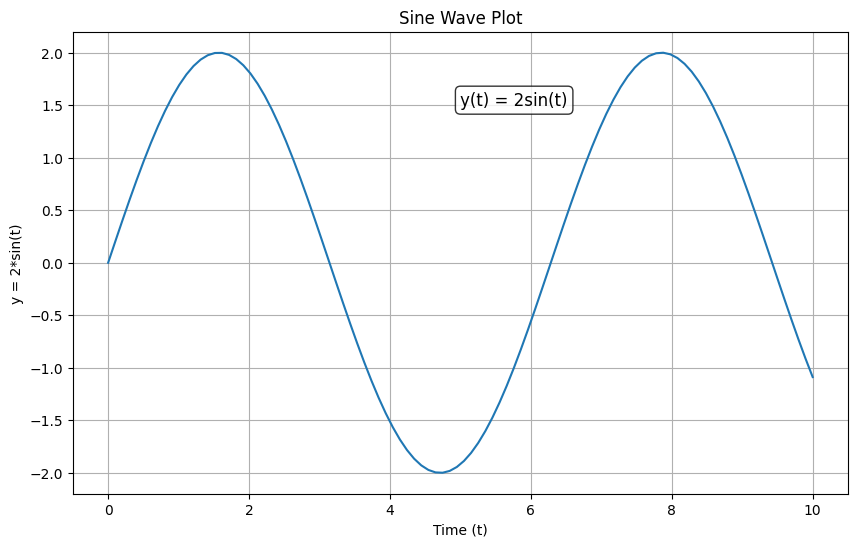
3D Plotting
# 3D plotting example
# Import 3D plotting toolkit for matplotlib (required for 3D surface plots)
from mpl_toolkits.mplot3d import Axes3D

fig = plt.figure(figsize=(10, 8)) # Create a new figure with a specific size
ax = fig.add_subplot(111, projection='3d')  # Add a 3D subplot to the figure

# Create meshgrid for 3D surface
x = np.linspace(-5, 5, 50)
y = np.linspace(-5, 5, 50)
X, Y = np.meshgrid(x, y)
Z = np.sin(np.sqrt(X**2 + Y**2))

# Create 3D surface plot
# Plot the 3D surface; cmap sets the color map, alpha sets transparency
# cmap='viridis' uses a blue-green-yellow color gradient for the surface
# alpha=0.8 makes the surface slightly transparent (1.0 is fully opaque)
surf = ax.plot_surface(X, Y, Z, cmap='viridis', alpha=0.8)
ax.set_xlabel('X')
ax.set_ylabel('Y')
ax.set_zlabel('Z')
ax.set_title('3D Surface Plot: Z = sin(√(X² + Y²))')
# Add color bar to indicate the mapping of colors to Z values
plt.colorbar(surf)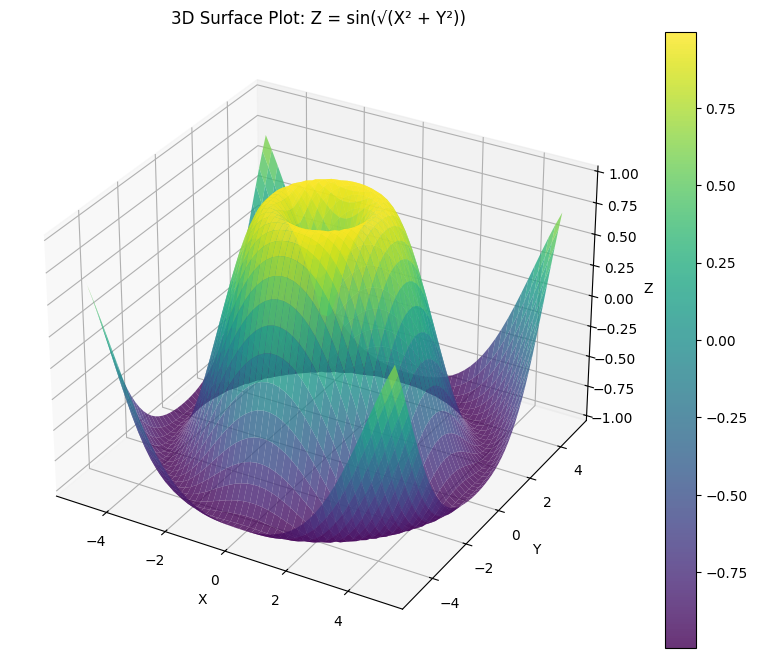
Plot with Custom Functions
In Python, you can define custom functions easily:
def ME529_fun(fxn_input):
    """Custom function that combines sine wave with random noise"""
    return 10 * np.sin(fxn_input * 10) + 5 * np.random.rand(*fxn_input.shape)

# Use the custom function
y_529 = ME529_fun(t)

plt.figure(figsize=(10, 6))
plt.plot(t, y_529, 'r-', linewidth=1.5)
plt.xlabel('Time (t), sec')
plt.ylabel('Function, f(t), -')
plt.title('Custom Function: 10*sin(10t) + 5*random')
plt.grid(True, alpha=0.3)
plt.show()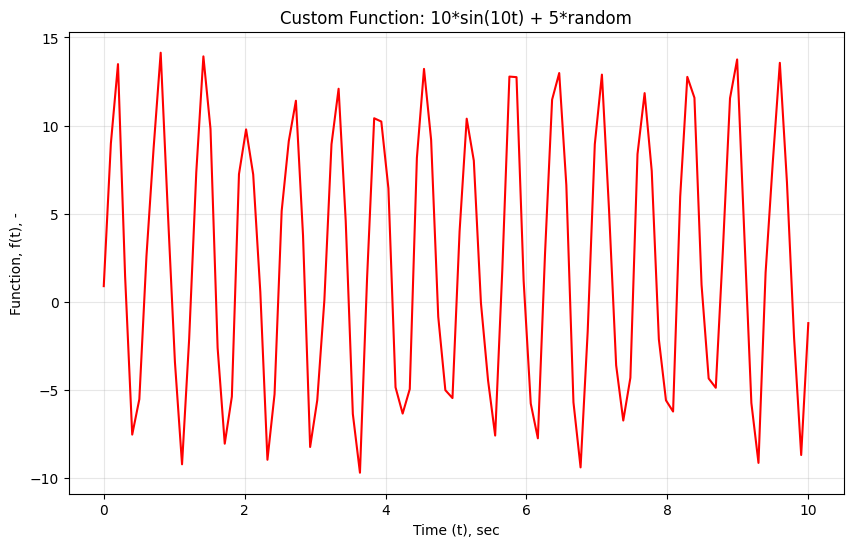
Task 4 – Debugging Techniques in Python
Effective debugging is crucial for engineering applications where accuracy is paramount. Python offers several powerful debugging tools and techniques that every engineer should know. We will go through two methods.
Method 1: Print statements and logging
# Method 1: Strategic Print Statements and Logging

def calculate_trajectory(v0, angle_deg, g=9.81):
    """Calculate projectile trajectory with debugging prints"""
    print(f"DEBUG: Input parameters - v0={v0}, angle={angle_deg}°, g={g}")

    # Convert angle to radians
    angle_rad = np.radians(angle_deg)
    print(f"DEBUG: Angle in radians: {angle_rad:.4f}")

    # Calculate components
    v0x = v0 * np.cos(angle_rad)
    v0y = v0 * np.sin(angle_rad)
    print(f"DEBUG: Initial velocities - vx={v0x:.2f}, vy={v0y:.2f}")

    # Time of flight
    t_flight = 2 * v0y / g
    print(f"DEBUG: Time of flight: {t_flight:.2f} seconds")

    # Range
    range_x = v0x * t_flight
    print(f"DEBUG: Calculated range: {range_x:.2f} meters")

    return range_x, t_flight

# Test with debugging output
result_range, result_time = calculate_trajectory(50, 45)
print(f"\nFINAL RESULT: Range = {result_range:.1f} m, Flight time = {result_time:.1f} s")
DEBUG: Input parameters - v0=50, angle=45°, g=9.81
DEBUG: Angle in radians: 0.7854
DEBUG: Initial velocities - vx=35.36, vy=35.36
DEBUG: Time of flight: 7.21 seconds
DEBUG: Calculated range: 254.84 meters
FINAL RESULT: Range = 254.8 m, Flight time = 7.2 s
Method 2: Python Debugger (pdb) - Interactive Debugging
The Python debugger allows you to pause execution, inspect variables, and step through code line by line.
Key pdb commands:
n(next): Execute next lines(step): Step into function callsl(list): Show current codep variable_name: Print variable valuepp variable_name: Pretty print variablec(continue): Continue executionq(quit): Quit debugger
# Method 2: Using pdb for interactive debugging
import pdb

def stress_analysis(force, area, material_strength):
    """Analyze stress with pdb debugging capabilities"""

    # Uncomment the next line to set a breakpoint
    #pdb.set_trace()  # Execution will pause here when uncommented

    if area <= 0:
        print("ERROR: Area must be positive!")
        return None

    stress = force / area
    safety_factor = material_strength / stress

    # You can also use breakpoint() in Python 3.7+
    # breakpoint()  # Modern way to set breakpoint

    result = {
        'stress': stress,
        'safety_factor': safety_factor,
        'is_safe': safety_factor >= 2.0
    }

    return result

# Example usage (uncomment pdb.set_trace() above to see debugger in action)
analysis = stress_analysis(10000, 0.001, 250e6)  # 10kN on 1cm², steel
if analysis:
    print(f"Stress: {analysis['stress']/1e6:.1f} MPa")
    print(f"Safety factor: {analysis['safety_factor']:.2f}")
    print(f"Safe design: {analysis['is_safe']}")
Stress: 10.0 MPa
Safety factor: 25.00
Safe design: True
HW Problems
Now that you’ve learned the basics, practice with these engineering-focused problems. Work through them step by step, using the debugging techniques you’ve learned. You need to submit your solutions to these HW problems with your source code.
Problem 1: Basic Python Syntax and Control Flow
In this task, you will analyze material properties for design selection.
Task: Write a program that:
Creates a dictionary of materials with their properties (density, yield strength, cost per kg)
Finds the material with the highest strength-to-weight ratio
Determines which materials are suitable for a given application (yield strength > 200 MPa, cost < $10/kg)
Uses proper error handling for invalid inputs
Given data:
Steel: density=7850 kg/m³, yield=250 MPa, cost=$2/kg
Aluminum: density=2700 kg/m³, yield=70 MPa, cost=$8/kg
Titanium: density=4500 kg/m³, yield=880 MPa, cost=$30/kg
Carbon Fiber: density=1600 kg/m³, yield=600 MPa, cost=$50/kg
# Problem 1 Solution Space
# Write your solution here

# Hint: Start by creating the materials dictionary
materials = {
    # Fill in the material properties
}

# Your code here...
Problem 2: NumPy Arrays and Mathematical Operations
In this problem, you will analyze experimental strain gauge data and plot them.
Task: Given strain measurements from 5 gauges over 10 time steps:
Create a 2D NumPy array (10 time steps × 5 gauges) with realistic strain data
Calculate the maximum, minimum, and average strain for each gauge
Find the time step where the maximum overall strain occurred
Calculate the stress using σ = E × ε (E = 200 GPa for steel)
Plot strain vs time for all gauges on the same plot with different colors
Add proper labels, legend, and title
Hints:
Use
np.random.normal()to generate realistic strain data around 0.001 (1000 microstrain)Use
np.argmax()to find indices of maximum valuesRemember to convert units properly (strain is dimensionless, stress in Pa)
# Problem 2 Solution Space
import numpy as np
import matplotlib.pyplot as plt

# Create time array
time = np.linspace(0, 10, 10)  # 10 time steps from 0 to 10 seconds

# Generate strain data (your code here)
# Hint: strain_data = np.random.normal(loc=0.001, scale=0.0002, size=(10, 5))

# Your analysis code here...
Problem 3: Functions and Engineering Calculations
In this problem, you will practice how to define functions for designing a simply supported beam.
Task: Create functions to analyze beam deflection and stress:
Function 1:
calculate_beam_properties(width, height, length, material)Input: beam dimensions (m) and material name
Output: dictionary with area, moment of inertia, weight
Include error checking for positive dimensions
Function 2:
analyze_point_load(load, position, beam_length, E, I)Input: point load (N), position (m), beam properties
Output: maximum deflection and stress
Use: δ_max = (P×a×b×(L²-b²-a²)) / (6×E×I×L) for deflection
Use: σ_max = M_max×c / I for stress (M_max = P×a×b/L, c = height/2)
Function 3:
safety_check(actual_stress, actual_deflection, beam_props)Check if stress < yield_strength/safety_factor (use SF=2.5)
Check if deflection < L/250 (standard deflection limit)
Return detailed safety analysis
Test your functions with a steel beam (200×300 mm, 4m long) with 10kN load at 1.5m from left support.
Material properties: Steel E=200 GPa, yield strength=250 MPa, density=7850 kg/m³
# Problem 3 Solution Space

def calculate_beam_properties(width, height, length, material="steel"):
    """
    Calculate basic beam properties

    Parameters:
    width, height, length: beam dimensions in meters
    material: material name (currently only steel implemented)

    Returns:
    dict: beam properties
    """
    # Your code here
    pass

def analyze_point_load(load, position, beam_length, E, I):
    """
    Analyze beam under point load

    Returns:
    dict: deflection and stress analysis
    """
    # Your code here
    pass

def safety_check(actual_stress, actual_deflection, beam_props):
    """
    Check beam safety factors

    Returns:
    dict: safety analysis results
    """
    # Your code here
    pass

# Test case
beam_width = 0.2      # 200 mm
beam_height = 0.3     # 300 mm
beam_length = 4.0     # 4 m
applied_load = 10000  # 10 kN
load_position = 1.5   # 1.5 m from left

# Your test code here...